|
<< Click to Display Table of Contents >> RCS Order Summary - RCS Preference |
  
|
|
<< Click to Display Table of Contents >> RCS Order Summary - RCS Preference |
|
Clicking on the  button to view and manage the RCS Order's Preference.
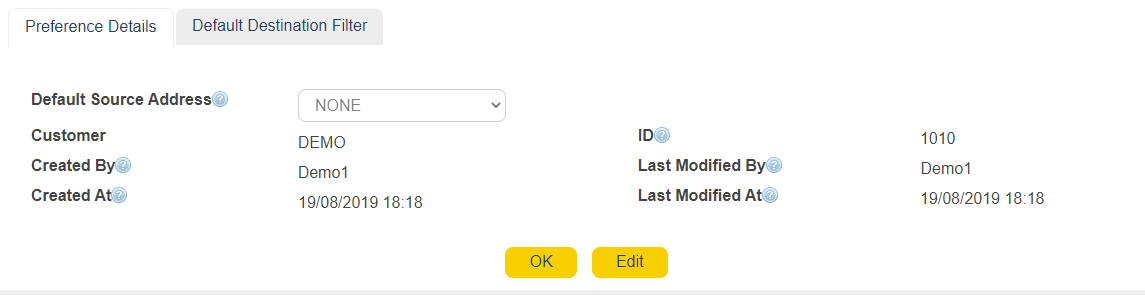
Default Source Address
|
Choose the default address source to send out RCS messages
|
|
Customer
|
Provides information on the RCS Order's Customer
|
|
ID
|
Order ID
|
|
Created By
|
User who created the Order
|
|
Created At
|
Order creation date and time
|
|
Last Modified By
|
User that modified the Order last
|
|
|
Time of last modification
|
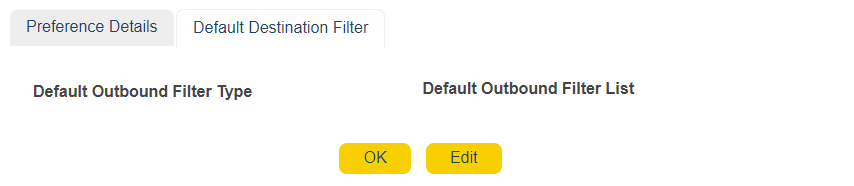
The Default Destination Filter tab is used to decide where to filter potential responses received for RCS Orders.
These responses will determine whether the audience shall continue receiving this Order going forwards, or be filtered out from receiving any subsequent Orders.
Clicking on the edit button brings up the options to modify this tab.

Default Outbound Filter Type
|
Choose one of the two options ; BLACKLIST or WHITELIST depending on where the list is to be categorized. |
Default Outbound Filter List
|
Depending on what is chosen on the above field, pick a list that co-relates to the filter action required.
|