|
<< Click to Display Table of Contents >> Voice IVR |
  
|
|
<< Click to Display Table of Contents >> Voice IVR |
|
SOPRANO MEMS lets you set-up automated IVR flows using Voice in conjunction with Inbound application. Call Control Object have most important role to play when you setup an IVR Call flow. It is crucial to understand the concepts of Call Control Object before you proceed further. Please visit the link and explore the section on SOPRANO MEMS in order to create a powerful IVR for your enterprise.
Once you've learned how simple it is to send voice calls using Call Control Objects, you are a step away from setting up your IVR campaign.
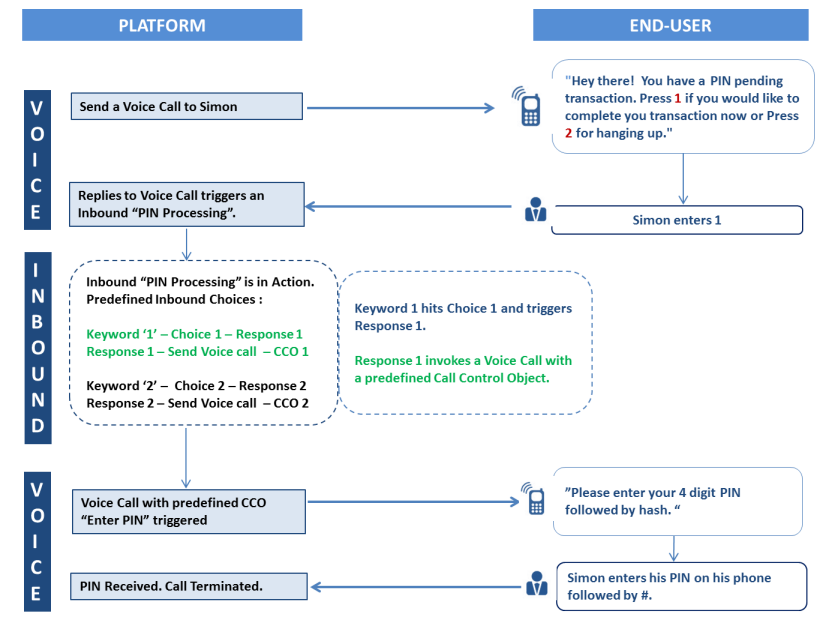
Let's look at the below example where we are setting up an IVR to let our end-user Simon complete a PIN pending transaction. We must have access to SOPRANO MEMS Voice & Inbound solution as a prerequisite, in order to generate an automated flow with ease and zero coding effort. We've depicted platform's automated actions on the left and end-user experience on the right side of the below flow. Notice the product being utilised at each step in the left most bar and follow the sequence step-by-step:
Check Voice Features & Inbound Features to learn more about benefits and capabilities of the products.
In the next section, we have explained steps for setting up IVR using the same example stated above. This example will help you learn about the setup and trigger your first IVR call using SOPRANO Voice. Click here.