|
<< Click to Display Table of Contents >> Synchronisation Flow |
  
|
|
<< Click to Display Table of Contents >> Synchronisation Flow |
|
Below we have depicted the synchronisation flow triggered by SOPRANO Active Directory Plugin:
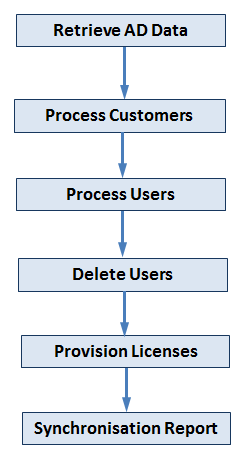
Retrieve AD Data - |
Retrieve customer information through predefined protocol (LDAP, FTP, FTPS, SFTP). This retrieve could be either forced or scheduled.
|
Process Customers - |
Update customer details and, if applicable, update or even create new sub-customers.
|
Process Users - |
Update or create new Users.
|
Delete Users - |
Delete user entries based on the updated times and provision/re-provision user licenses.
|
Provision Licenses - |
System will then attempt to de-allocate and re-allocate available user licenses to cater for any recently added or deleted users.
|
Synchronization Report - |
After each of the synchronisation, system generated a report detailing all deltas i.e. creations, modifications and deletions will be sent by email to the customer admin at the head sub-customer. |