|
<< Click to Display Table of Contents >> Manage Replies |
  
|
|
<< Click to Display Table of Contents >> Manage Replies |
|
SOPRANO GAMMA allows the user to define how replies will be handled should any recipient send a response to the message they receive as part of this order. The user can choose to route replies to different destinations.
Select the Replies tab. There are 4 options which can be selected from the Reply To drop-down menu. The default selection is INBOX:
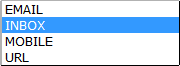
Inbox
All replies will go to the SOPRANO GAMMA platform inbox.
|
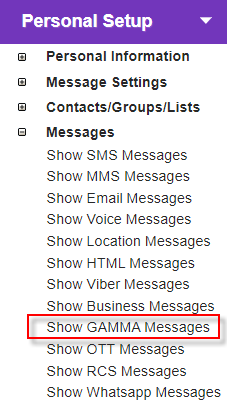
Note: This is not an email inbox, and therefore no Reply to Address is required. Inbox refers to the SOPRANO GAMMA platform. To view your SOPRANO GAMMA Inbox replies, go to the Personal Setup menu and click Messages > Show GAMMA Messages.
|
|
Choose Email from the dropdown list and specify an email address. The default is the email address associated with the current login.

Mobile
Choose Mobile from the dropdown list and specify a mobile number. The default is the mobile number associated with the current login.
|
URL
Choose URL and specify the web address where replies should be forwarded.
|