|
<< Click to Display Table of Contents >> Changing Your Mobile Status |
  
|
|
<< Click to Display Table of Contents >> Changing Your Mobile Status |
|
Mobile app users have the ability to change their status within the SOPRANO GAMMA mobile app to indicate if they are currently available to receive messages.
iOS: Open the app > Press Profile in any of the tabs > press Status to display the available options.
Android: Open the app > Select Profile from the ellipsis icon on the top right corner > press Status to display the available options.
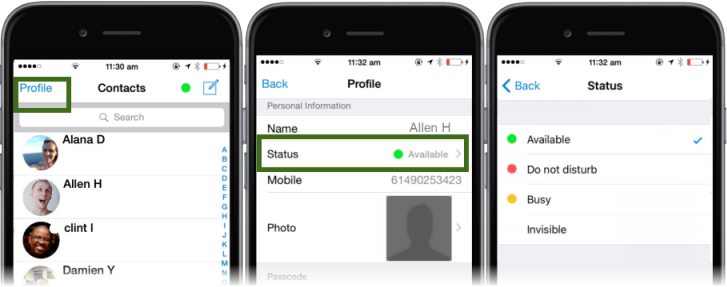
The status chosen will be updated into the contact list. A user's status is indicated by a coloured dot embedded on the avatar in the Messages screen of the app as displayed in the first screen shot above.