|
<< Click to Display Table of Contents >> Voice Company Voice Preferences |
  
|
|
<< Click to Display Table of Contents >> Voice Company Voice Preferences |
|
Company Voice Preferences set up can be utilised by Customer or Platform Administrators to set Voice source address. This setup will impact all the orders sent via Voice API & web portal.
* Only for users with administrator-level access.
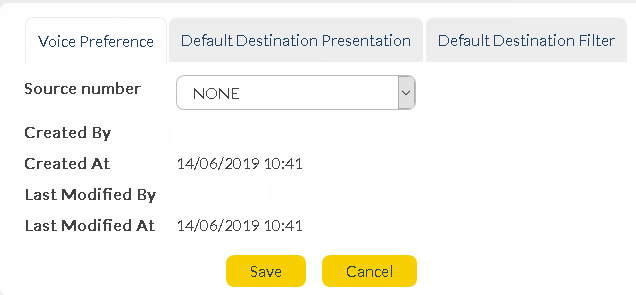
Define Preferences - Please note that these settings apply to all Voice Messaging orders sent via API or the Voice Messaging web application. Under preferences you need to configure the below attributes :
|
||||
|
Source Number |
This will be presented as the sender (i.e. Caller ID) of Voice messages on the receiving device. This is part of administrator setup. In order to set-up source address of your own choice, please contact the provisioning team.
Available numbers depend on account provisioning. If any extra dedicated number is required as a Voice source address, this must be provisioned separately on the system. |
|---|
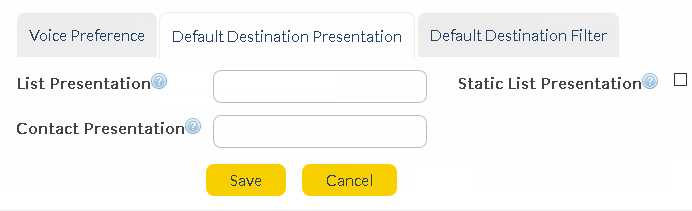
Default Destination Presentation Settings : This setting does not apply to Voice API orders - only orders sent SOPRANO MEMS from web application.
|
||||
|
The following are mail merge functions, meaning you can extract information from your contact and list records and present it instead of raw numbers in reports. So, instead of just seeing a list of numbers when viewing reports, you can see names, or other useful information. Click below links to expand.
This applies where you have selected a list from your SOPRANO MEMS Address Book as the destination for an order. The destination will be presented as the mobile number, by default, in reports. This does not tell you much about who is receiving a message. You might want to quickly identify a recipient by name. This is when the 'List Presentation' field becomes useful.
In a SOPRANO MEMS Address Book list, each list item has a row dedicated to it, and each piece of information on the row is separated by a comma. For example - 61491234567,Smith,John. If we represent this as a basic sequence of numbers, we get:
•1,2,3 (61491234567=1,Smith=2,John=3)
This means if we have a list containing many rows, '1' can be used to represent the first item in every row, '2' for the second item after the comma, and so on.
The 'List Presentation' field lets users extract these values and present them instead of a mobile number in reports. The 'curly bracket' symbols are used together with numerical values to achieve this, as in the following example:
By using the above List Presentation, you are telling SOPRANO MEMS the following:
•In the 'To' column of any Voice order message reports, if the destination was a list, show the 1st item of the row, followed by a space, hyphen, space, then the 2nd item in the row, followed by a comma, space, then the 3rd item in the row. Do this for every item in the list.
Therefore, using the previous example, the 'To' field entry would be: 61491234567 - John, Smith
|
This applies where you have selected contacts, or groups (which contain 2 or more contacts) from your SOPRANO MEMS Address Book as the destination for an order.
Similar to 'List Presentation' (see above), you can use mail merge functionality to replace the destination number in reports with other values. Instead of using numbers which correspond to list items, variables are used to call values from the recipients' 'Contact Details'.
e.g. if '$first %last' values are saved in the 'Contact Presentation' field, the values saved in 'First Name' and 'Last Name' fields will be displayed instead of a mobile number in any related reports.
So, to achieve the same result as in the 'List Presentation' details above, you would enter the following:
It is important to make sure that the values you are trying to call are actually saved in the 'Contact Details'.
Available variables are:
•$first •$last •$phone •$mobile •$address •$city •$country •$postcode •$fax
|
The above 'List Presentation' field also appears when you create or edit a list in your SOPRANO MEMS address book. Ticking this check box ensures that the 'Company Voice Preferences' setting will override anything entered in the 'New/Edit List' screen. |
Define Default Destination Filter : Select a whitelist or blacklist if you wish to filter particular destinations from receiving Voice Orders.
|
||||
|
Default outbound filter type |
The type of filter you want to apply to Voice Orders, if any. Options:
•None (Default) •Blacklist •Whitelist
|
Default outbound filter list |
Pre-existing Address Book list of people who will either always or never be sent Voice messages, depending on whether 'Blacklist' or 'Whitelist' is the chosen filter type. Options:
•None (Default) •Existing address book list
Expected behavior : A valid list of mobile destinations is selected. If 'Whitelist' is the selected 'Filter Type', those destinations are considered 'opted in' and will always receive Voice orders. If 'Blacklist' is the selected type, those destinations will always be excluded from receiving Voice orders.
|