|
<< Click to Display Table of Contents >> Viewing SMS Templates |
  
|
|
<< Click to Display Table of Contents >> Viewing SMS Templates |
|
As an administrator you must ensure that SMS template are configured and available for the 'Simple Template - Standard User' for sending messages.
Let’s look at the steps for viewing existing templates:
*You must be a customer administrator to perform below steps.
1.Login to the portal.
2.Go to ‘SMS’ in the top menu options and select ‘SMS Standard Template’ or 'SMS Broadcast Template' from the drop-down menu.
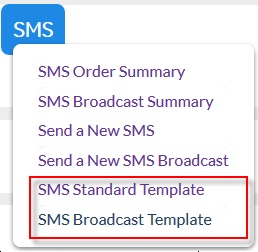
3. All the existing templates summary will appear on the screen.

4. As an admin, you have an option to ‘Clone’, ‘Edit’ or ‘Delete’ the templates using plus, pencil or cross icon respectively. You may click on the template names to view each tab or edit details of message template.