|
<< Click to Display Table of Contents >> Reports - Home |
  
|
|
<< Click to Display Table of Contents >> Reports - Home |
|
Overview
The 'Reports: Home' page is the central hub for accessing the various reports which are available depending on your user licences.
|
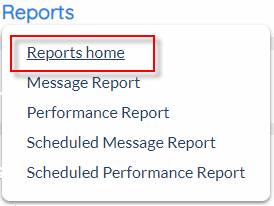
Click the 'Reports' tab at the top of the interface to open the 'Reports' drop-down menu.
Click 'Reports' to open the 'Reports: Home' screen, containing links to all available report types.
|
Description
Go to the appropriate section and click the link which matches the required report type.
Reports: Home |
Summary Reports
|
'Summary' reports allow users to generate SOPRANO MEMS summary data via a variety of custom filters ('Reports+' licence required).
Click here for more information.
Message
|
'Message' reports allow users to generate SOPRANO MEMS message report data via a variety of custom filters.
Click here for more information.
Appointment Reminder
|
'Appointment Reminder' reports allow users to generate SOPRANO MEMS Reminder report data via a variety of custom filters (Reminder product licence required).