View Call Control Object Summary

<< Click to Display Table of Contents >>

Navigation:  Soprano Campaign Tools > Voice > Call Control Objects >

View Call Control Object Summary

Previous pageReturn to chapter overviewNext page


Login to the SOPRANO MEMS web portal.


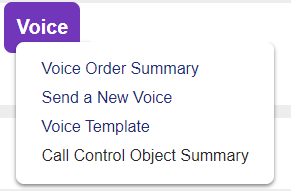
Select 'Voice' tab from the menu options in  SOPRANO MEMS and click 'Call Control Object Summary'.


You will be taken to the home screen as shown below:


Call Control Object Summary  

  Summary                                                                                                                                    


Create a new Call Control Object


All Objects - All objects created by users belonging to the parent customer will be displayed in the summary table.


My Objecrs - Only objects created by the current user will be displayed.


Load order summary.


Click an object name to view its details or one of the following icons (if available):


Change details.


Opens an identical copy, which you can edit as necessary and re-use.


Remove permanently from the system.